Hey Guys,
Today I will post about a problem that occurs when a computer that has Active Directory installed and the server cannot start. If you have got a blue screen with an error code 0x00002e2 like the picture below, we have a solution for you.

It happened because the Active Directory database was probably corrupted. Follow these steps just if it occurred in a secondary AD.
First, we will restart the server into Directory Services Repair mode.
If you have doubt to proceed with it, you can follow this article
When windows starts, put in the admin credentials and go to server manager.

At Server Manager console, go to manage and then remove roles and features. Uncheck “Active Directory Domain Services” and “DNS server” to remove it. When the poup-up appears, click on “Remove features”.
If you receive an error message like “The Active Directory domain controller needs to be demoted before the AD DS role can be removed”, don’t worry.

On wizard, click on “Change button” and then type a credential that has domain admin’s privileges.


Now, check “Force the removal of this domain controller” and click in Next.
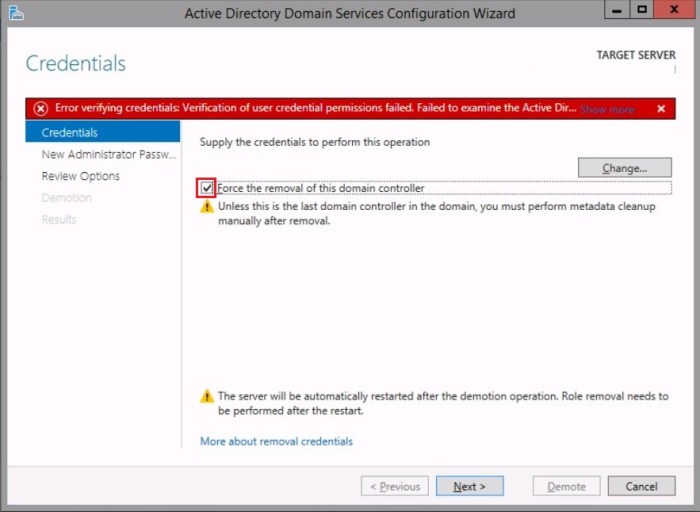
As your server will be a member server, you just have to type a new password for Administrator’s account. Type it, repeat the password and click next.

In this step, click in demote and wait some minutes.
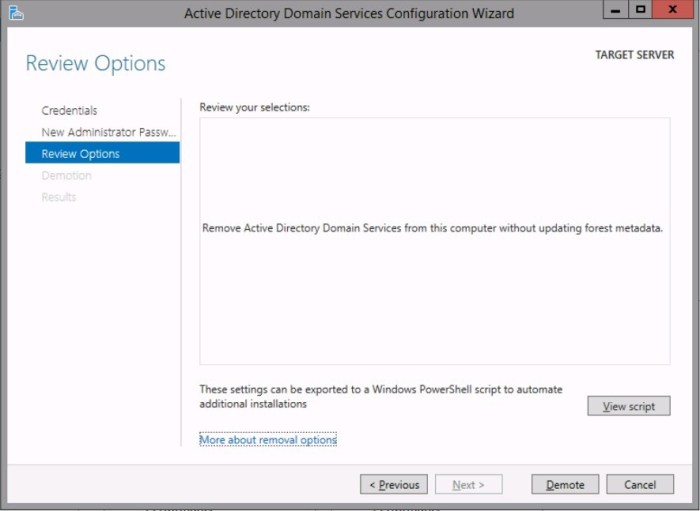
You will get a message about the sign out and the server will restart.

If you have done everything as mentioned in this article, now you have to clean up the metadata from Active Directory. The DC that you have removed, it still has objects in Active Directory.
You can follow this article to clean up the AD metadata.
TIP: If you try to delete the computer object (DC) in domain controllers’ OU and you receive an error message about privileges. Right-click on DC that you want to delete, click on properties, go to security tab and then grant explicit rights (full control) to your account, click ok and try to delete the demoted DC from Active Directory.
Right now, you have to replicate the changes to all Domain controllers in your environment.
In each DC open a command prompt as administrator and type:
repadmin /sync /AdePq
You should not receive any error, even if you don’t, you can double check and certify that the deleted DC is not appearing in Domain Controllers’ Organization Unit.
Do it in each Domain controller.
Now you are able to promote the server as Domain controller again.
I hope this guide helps you to fix the problem.
See you on the next post!

 Patrick de Barros Albuquerque